Documentation
Learn how to use anvay for topic modelling, visualisation, and interpretive analysis.
Introduction
anvay is a web-based platform for topic modelling and interpretive analysis of text corpora. Built for scholars, students, and digital humanists, it provides an end-to-end workflow that enables users to upload a corpus, generate interpretable topic models, and explore their thematic structure through a suite of interactive visualisations and reports.
At its core, anvay uses Latent Dirichlet Allocation (LDA) to uncover latent themes in textual corpora. It complements this algorithmic analysis with tools that foreground interpretability and readability — especially for morphologically rich and low-resource languages.
Supported Languages
Contents
Each of the following sections corresponds to a tab in the documentation. Together, they walk the user through the entire modelling process, from theory to interpretation:
- Introduction: What is anvay? Supported languages.
- Topic Modelling: Introduces the logic behind topic models and their assumptions.
- Using anvay: A walkthrough of the upload interface and core configuration options.
- Help & Errors: Commonly faced issues.
- Glossary: Definitions of technical terms and further reading recommendations.
Key Features
- Customisable topic modelling with fine-grained parameter control
- Language-specific preprocessing for Bengali, English, Hindi, and Tamil
- Multiple interactive visualisations: scatterplots, heatmaps, pie charts, word networks
- Structured report with topic summaries, top terms, document drilldowns, and quality flags
- Built-in stopword lists for Bengali, Hindi, and Tamil — downloadable and customisable
- Lightweight, browser-based interface with no data retention or third-party processing
Why anvay?
Most topic modelling tools are not built for Indian languages, and fewer still are designed with interpretability in mind. anvay is unique in combining a rigorous LDA pipeline with meaningful post-processing: relevance-weighted top words, flagging of low-confidence topics, representative paragraph extraction, and topic-document linking. It is designed for exploration as much as explanation, and aims to bridge computational methods with close reading.
How the Workflow Unfolds
anvay offers an end-to-end workflow that guides you from raw text to interpretive insight:
Upload
Drop in .txt files
Configure
Select parameters
Train
Model discovers topics
Visualise
Explore topic maps
Interpret
Name and refine
Download
Export results
Note: Issues with Processing Text
Processing text for topic modelling involves constraints that vary significantly by language. No tool can fully resolve the ambiguity of language — users are encouraged to view topic models not as definitive maps, but as exploratory guides: shaped by data, framed by parameters, and ultimately interpreted through human reading.
Bengali, Hindi, and Tamil are morphologically rich — inflected forms, compound constructions, and script-specific characters (like zero-width joiners in Bengali, or Tamil vowel markers) affect tokenisation quality. English is simpler in this regard, but OCR noise and domain jargon still matter.
News texts yield clearer clusters due to formulaic structure. Literary texts are more fluid, with shifting voices and metaphors that blur topical boundaries. This applies regardless of language — though the effect is often more pronounced in Bengali and Tamil literary corpora.
The platform applies language-specific preprocessing and topic diagnostics. Bengali has the most mature pipeline. English, Hindi, and Tamil are functional but experimental — results should be interpreted with additional caution and validated against the source texts.
Topic Modelling
Topic modelling is a statistical method used to identify recurring themes in large text collections. Rather than categorising documents manually, topic models detect patterns of word co-occurrence and infer abstract themes based on them.
The most widely used algorithm is Latent Dirichlet Allocation (LDA), which makes two key assumptions:
Documents as Topic Mixtures
Can a single document contain multiple topics?
Yes — LDA models each document as a blend of topics in different proportions. For example, one story might be 60% about migration and 40% about domestic life.
Topics as Word Distributions
How does the model define a topic without labels?
A topic is simply a group of words that tend to appear together. For example, a farming topic might include words for village, rice, land, cultivate, and farmer — in whatever script you are working in.
Interpretation Follows Modelling
Does the model know what the words mean?
No — the model detects statistical patterns, not meaning. It's the researcher who interprets the topics after modelling is complete.
What Topic Modelling Is Useful For
- Exploring dominant themes in large, unlabelled corpora
- Identifying discursive shifts over time or across genres
- Clustering documents before manual annotation or review
- Forming hypotheses for deeper interpretive analysis
Click to expand: Why Topic Modelling Requires Caution
Topic models operate on co-occurrence, not semantics. In noisy or morphologically complex corpora, models may group suffixes, filler, or OCR artefacts as if they were meaningful. Always combine quantitative exploration with qualitative judgement.
How Do Machines Imagine Topics?
anvay uses a topic modelling algorithm called Latent Dirichlet Allocation, or LDA. It's one of the most widely used methods for discovering thematic structure in large text corpora — and it's implemented here using the gensim Python library.
LDA is a probabilistic model that assumes every document is a mixture of latent "topics," and each topic is a distribution over words. It doesn't "understand" your texts — it notices patterns. If certain words tend to appear together across documents, the model assumes they belong to the same thematic cluster.
Technically, every word in the corpus — even common ones — is assigned a topic distribution. But most pipelines (including ours) filter out high-frequency, low-meaning words before modelling. The topics you interpret are built from the more distinctive words that remain.
In other words, LDA doesn't give you meaning. It gives you structure. It shows you where clusters of co-occurrence exist — and leaves it to you, the reader, to decide which ones matter.
To help you understand how this works in practice, we've included a sentence-building activity below. Select words from a shared pool, construct a sentence, and analyse which topics those words are most likely to belong to. You'll notice that topic assignment depends on word co-occurrence — not grammar, logic, or truth. Switch between languages to see how distributional assumptions play out across different scripts.
Your Sentence:
Reading Topics: Interpretation and Probability
Topic modelling doesn't assign hard categories. Every word in every document is given a probability of belonging to each topic. Even a seemingly irrelevant word like "the" or "but" is mathematically linked to every topic — just with very low weight. Conversely, strongly associated words might belong to multiple topics with varying strengths.
This means that "topics" are not neat buckets, but soft groupings — blurry constellations of co-occurrence. What feels like a coherent theme is, in fact, a pattern we detect and make sense of as readers. The model shows us structure, but not meaning. We impose that meaning by recognising which words rise to the top, and how they resonate with our sense of language, genre, or context.
In literary texts, this becomes even more complex. Characters shift registers, metaphors disguise literal meaning, and themes bleed across documents. Topic models can surface patterns, but not always meanings. They require interpretation — and that interpretive labour is an essential part of working with LDA, especially in the humanities.
Corpus Preparation
The quality of your topic model depends on the quality of your input. While anvay attempts to handle malformed characters, OCR noise, and common formatting issues, the most meaningful results come from a clean, well-prepared corpus. Below are guidelines — and examples — to help you curate your files effectively.
What Good Input Looks Like
The principles are the same regardless of language: plain prose, clean encoding, no page markers or structural artefacts.
Problematic Input (any language)
--- PAGE 1 ---

*** OCR Scanned ***

@#$%^&

Chapter 4: The Changing Tide

	It was raining...
Preferred Input (any language)
It was raining. The minister arrived
quietly. People gathered near the tent.
No slogans were shouted.
Language-Specific Considerations
পৃষ্ঠা ১, ***, speaker names like রামু বলল in dialogue.
है, था, और, में are already included.
Lemmatisation uses simplemma, which is dictionary-based and experimental for Hindi.
Tip: Copying from PDFs may introduce invisible characters in any language. Always open your files in a text editor to verify they are saved in UTF-8 before uploading.
Best practice: Use clean plain-text files, one file per document. Avoid headers, footers, and formatting markup of any kind.
Uploading Files
On the upload screen, drag and drop your .txt files or use the file picker. Each file you upload is treated as a separate document in the topic model. The more files you include, the more stable and interpretable your results — but there are practical limits to ensure performance and readability.
- Maximum files: 200 per submission
- Maximum file size: 1 MB per file
- Total upload size: 5 MB per submission
- File format: Plain text (
.txt) only - Encoding: UTF-8 (mandatory for all languages)
How File Uploads Work
Each file represents one document. The model learns themes across the corpus by analysing word patterns across these documents. If your files are too short (under ~300 tokens), topics may feel weak or generic. If they are too long or unevenly distributed, dominant documents may skew topic prevalence.
Use consistent file formatting and avoid uploading empty, duplicate, or placeholder files. File names are displayed in the Report tab, so name them meaningfully to track interpretations. Filenames in any language — Bengali, Hindi, Tamil — are fully supported and will display correctly in all charts.
What Not to Upload
- PDFs, Word docs, or ZIP files — only plain
.txtfiles are accepted - Files with non-UTF-8 encodings — these may break preprocessing or display gibberish
- System files (like
.DS_Store) — these will be ignored or discarded
Tips for Best Results
- Use UTF-8 encoding (check in your text editor or use Save As → Encoding)
- Avoid OCR scans or pasted content from PDFs unless cleaned (see Corpus Preparation)
- If a document contains less than 100 tokens after filtering, it may be skipped automatically
- Use short, descriptive filenames to help interpretation later — e.g.
tagore_ghare_baire.txt,premchand_godan_ch1.txt
Stopwords
Stopwords are high-frequency words — such as pronouns, particles, or auxiliary verbs — that tend to dilute topic modelling results. Removing them sharpens topic coherence by reducing statistical noise.
How anvay Handles Stopwords
anvay offers two mechanisms for stopword removal:
-
Use the built-in NLTK stopword list
Enable this by selectingYeson the Remove Stopwords field. NLTK provides stopword lists for BN Bengali and EN English. For HI Hindi and TA Tamil, this option has no effect — NLTK does not include these languages. -
Upload a custom stopword file
InAdvanced Options, upload a plain-text.txtfile with one word per line. This replaces the built-in list entirely for that run.
anvay provides ready-made stopword lists for Bengali, Hindi, and Tamil. Use the Download built-in stopwords list link next to the file input to get the list for your selected language — then edit it to suit your corpus before uploading. This is the recommended workflow for Hindi and Tamil, and for any domain-specific Bengali or English corpus.
If both the NLTK option and a custom file are active, the lists are automatically merged before modelling begins.
Language-Specific Guidance
Bengali texts often repeat verbs like বলল, করেছে, or জানাল that add noise but little thematic value. Dialogue-heavy or scanned texts especially benefit from a custom stopword list.
Before custom stopwords:
After:
The built-in NLTK English list covers articles, prepositions, conjunctions, and common auxiliaries. For domain corpora, supplement with domain-specific stopwords (e.g. chapter, page, ibid for digitised books).
No built-in NLTK Hindi stopwords are available. Download anvay's Hindi stopword list from the upload form — it already includes common particles and function words. Edit it to suit your corpus before uploading.
No built-in NLTK Tamil stopwords are available. Download anvay's Tamil stopword list from the upload form — it already includes common function words. Edit it to suit your corpus before uploading.
Example Stopword File Format
Use plain text with one term per line. Encoding must be UTF-8.
word1
word2
word3
Parameters
The parameters you choose during upload affect how the model processes your texts and extracts topics. Some are intuitive, others more technical. Begin with recommended ranges — then adjust gradually based on the interpretability of your output.
Basic Parameters
Number of Topics
This controls how many thematic clusters the model will attempt to identify. It's not a fixed setting — it depends heavily on your corpus:
- Small, focused corpora (e.g., 30–50 short documents): try
5–10topics - Medium corpora (100–200 documents with some variation): try
10–20 - Large, diverse corpora (e.g., 500+ documents or full-length essays): you can try
30–50+, but interpret with care
Tip: If topics feel repetitive or unclear, reduce the number. If topics feel too broad, increase gradually. The goal is not coverage — it's clarity.
Language
Select the primary language of your uploaded documents. This controls which tokeniser, normaliser, and stopword list are used. Do not mix languages within a single run — upload multilingual corpora as separate analyses.
Normalisation
Reduces word forms to a common base. The available options depend on language:
- BN Stemming — reduces Bengali inflected forms via dictionary lookup (e.g.
খাচ্ছে,খেয়েছে→খা). Recommended for most Bengali corpora. - EN Lemmatisation — reduces English words to dictionary forms (e.g. running → run). Recommended.
- HI Lemmatisation — experimental Hindi lemmatisation via simplemma. Use cautiously.
- TA Stemming — dictionary-based Tamil stemming. Recommended for Tamil corpora.
Advanced Options
Remove Top Words (%)
Automatically discards the top N% most frequent words across the corpus. These often include generic verbs or connectors that don't add thematic value. Start with 5–10.
Filter: No Below
Removes words that appear in fewer than N documents. Useful to exclude rare noise — typos, one-off names, OCR artefacts. Recommended: 3–10.
Filter: No Above
Removes words that appear in more than this fraction of documents. These are often uninformative. Recommended: 0.5–0.7.
Alpha and Eta
These govern sparsity:
- Alpha: Lower values → fewer topics per document (sharper focus)
- Eta: Lower values → fewer words per topic (sharper boundaries)
alpha = 0.5 and eta = 0.5 produced clean, interpretable topics. Outcomes depend on corpus structure — experiment to find what works best for your data.
Chunk Size
Controls how many documents are processed at once during training. This affects speed and memory use — not model quality. Default: 100–200.
Per-word TopicsVisualisations
Each visualisation in anvay helps you explore your topic model from a different angle: identifying overlap, strength, evolution, and prevalence.
Note: All visualisations display the top words for each topic on hover — making it easy to identify and interpret topics directly from the charts without switching back to the Report tab.
1. Topic Similarity Scatterplot
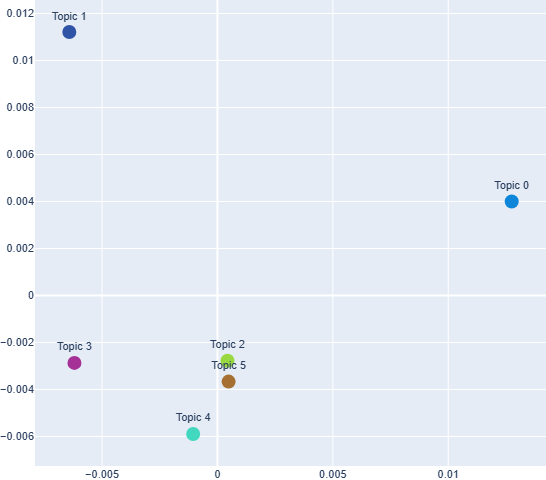
Closer dots = more similar topics. This chart plots topics based on their word distributions. Topics that are close together share many high-weight words. Use this to identify overlapping themes or cluster boundaries.
Axes: Both axes represent a two-dimensional projection of topic–word distributions. Distance between points reflects topic similarity; the axes themselves have no intrinsic semantic meaning.
2. Topic × Word Heatmap
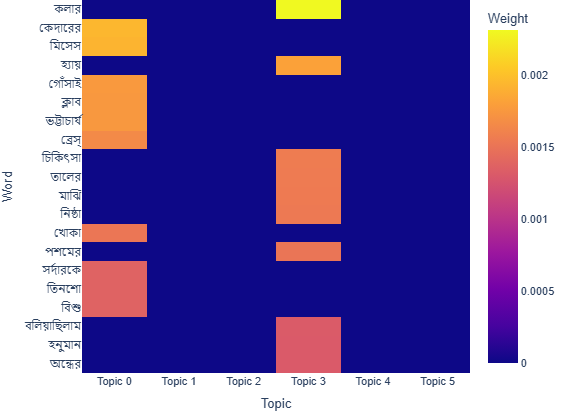
Brighter cells = stronger topic–word link. Each cell shows how strongly a word is associated with a topic. Use this to explore overlap and word distribution depth. This view presents the same information shown in the bar chart, but emphasises patterns and contrast across topics.
Axes: The horizontal axis lists topic indices, and the vertical axis lists a globally selected set of high-weight words. Cell intensity reflects the strength of association between a word and a topic.
3. Topic Prevalence Pie Chart
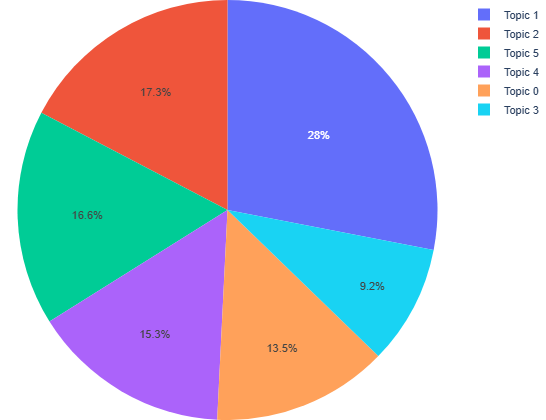
Bigger slices = more dominant topics. This chart shows how much each topic contributes to the corpus overall.
Encoding: Slice size represents the cumulative weight of a topic across the corpus.
4. Top Word Frequency
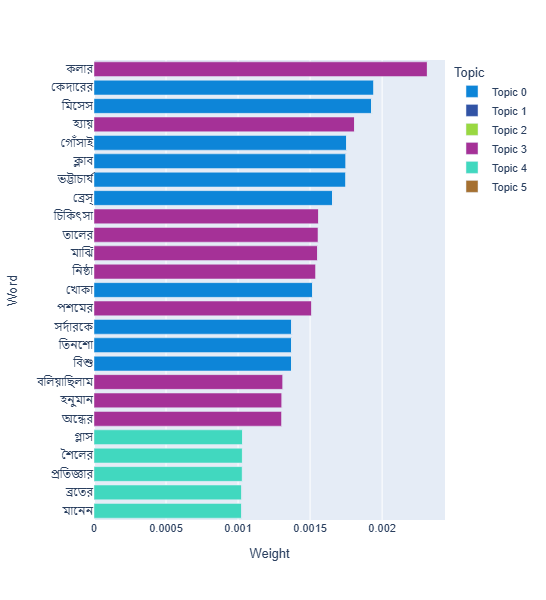
High bars = frequent words in your corpus. Use this to inspect lexical dominance and identify potential noise.
Axes: The horizontal axis shows word tokens, and the vertical axis shows their frequency in the corpus after preprocessing.
5. Topic–Word Network Graph
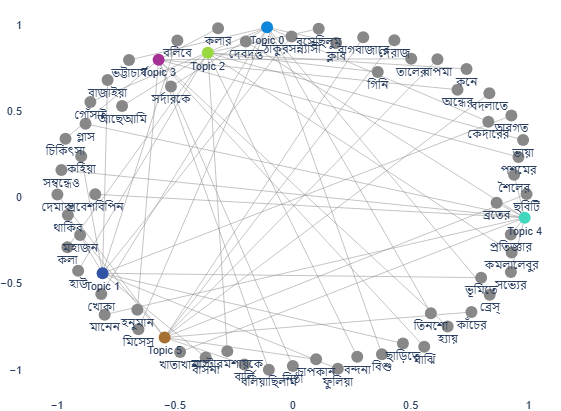
Each topic node links to its top words. Blue circles are topics, grey ones are words. Helps visualise word overlap and outliers.
Encoding: Spatial layout reflects relational structure rather than scale; proximity and connections indicate association, not distance or magnitude.
6. Topic Evolution Over Time
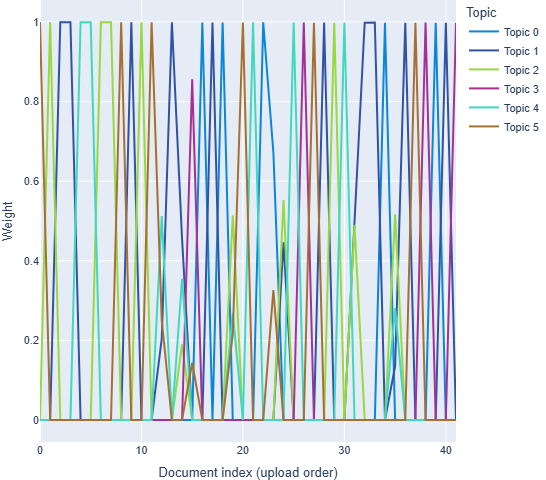
Each line shows a topic's weight across time. Use this to detect historical shifts or evolving discourse patterns.
Axes: The horizontal axis represents document order (or a derived sequence such as time bins), and the vertical axis shows topic weight, tracing how topic presence changes across the corpus.
Use case: For example, if a novel is divided into chapters and each chapter is uploaded as a separate file with filenames reflecting chapter order, this visualisation can be used to examine how thematic emphasis shifts across the course of the narrative.7. Topic Distribution Across Documents
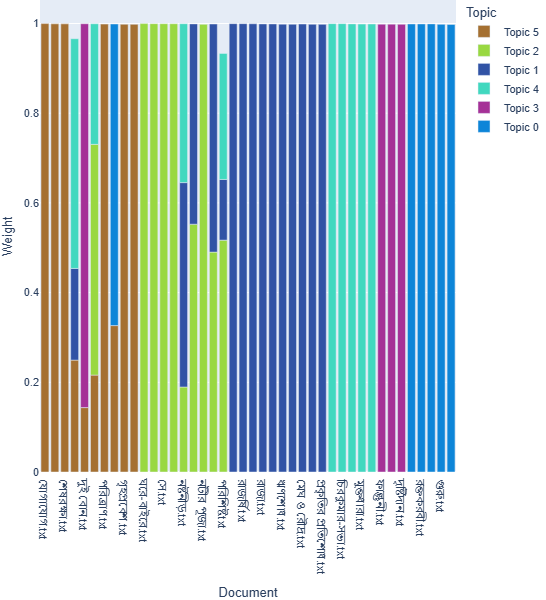
Each dot shows a topic's weight in one document. Useful for detecting niche vs. broad topics and skewed presence.
Axes: The horizontal axis lists documents in the uploaded corpus, and the vertical axis shows topic weight, indicating how strongly each topic is represented in individual documents.
8. Topic Distance (Clustering Dendrogram)
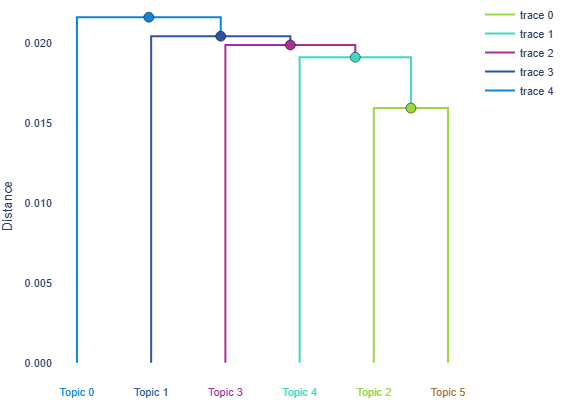
Shorter branches = more similar topics. This dendrogram clusters topics by semantic similarity. Helps spot overlap or hierarchy.
Axes: The vertical axis shows inter-topic distance, while the horizontal arrangement reflects hierarchical grouping rather than a quantitative scale.
Report
The Report tab gives you a structured breakdown of the model's results — from high-level training stats to granular, paragraph-level illustrations. It's designed to support interpretive work, especially when working with complex or literary texts.
Table of Contents
1. Training Overview
This section is designed to help you tune your topic model by reflecting on how the input data and training parameters shaped the model. It provides a snapshot of your corpus and the internal diagnostics logged during training. Used carefully, this is where interpretability begins.
Corpus Statistics
These values reflect the input that the model actually received, after all filtering and preprocessing. They help you assess whether your model is working with enough — and the right kind of — data.
- Total Documents: Each file uploaded is treated as one document. Fewer than 30 documents usually leads to unstable, overgeneralised topics. Over 100 allows more granularity.
- Average Document Length: If this is under
300 tokens, topics may feel thin or generic. In such cases, consider reducing stopword or rare word removal, disabling stemming, or merging short documents. - Vocabulary Size: The number of unique tokens remaining after filtering. A range between
1,000–10,000is often ideal for LDA.
Training Log
These logs come directly from the LDA engine (gensim), grouped into stages. They help you interpret model behaviour and stability.
- Token Filtering: Shows how many terms were discarded by your frequency thresholds.
- Training Configuration: Confirms what values were used for parameters like
alpha,eta, andchunksize. - Perplexity Estimates: Lower perplexity is usually better. Steady decline and flattening = good; rising after flattening = potential overtraining.
- Final Model Info: Marks the lifecycle stages of the model.
What to Do With This
- If your topics seem repetitive, generic, or incoherent, start by checking your average document length and vocabulary size.
- If training logs show rapid convergence but poor topics, try increasing
passesor adjustingalpha. - If perplexity never settles, it may indicate noisy input or a mismatch between the number of topics and corpus size.
2. Top Words per Topic
This section shows the top 10 words in each topic, ranked by their probability of occurring within that topic. These are taken directly from the model — no filtering, smoothing, or interpretation has been applied.
In technical terms, this is based on p(w | t) — the probability of a word given a topic. The higher the value, the more representative that word is for that topic. However, this measure does not account for whether the word is distinctive across topics.
How to Interpret
- Repetition across topics: If the same word appears in many topics, it may be common across the corpus — not distinctive. Consider adding it to your custom stopwords.
- Unusual terms: Some topics may include broken suffixes, particles, or OCR noise — signs of preprocessing issues, not model failure.
- Use your judgement: These word lists are prompts. Try to label each topic yourself — what theme or discourse might these words suggest?
- Check against documents: Return to the representative sentences. Do the top words actually appear in those contexts?
3. Topic Weights per Document
This section shows how each topic contributes to each document, based on the topic model's output. The weights are probabilistic, not categorical — every document is a mixture of topics, and every topic appears in multiple documents to varying degrees.
Each value represents p(t | d) — the model's estimate of how likely topic t is to occur in document d. The sum of all topic weights for a single document is 1.0.
How to Read This Table
- High values (e.g. ≥ 0.6): indicate a document where that topic is dominant.
- Flat distributions: If a document has many topics with small weights (e.g. 0.05–0.15), it may not fit cleanly into any one theme.
- Repeated patterns: If the same topic dominates across many documents, your model may be too coarse.
- Missing weights: A topic with
0.0in a document does not appear there, or appears below the model's threshold.
Example: Suppose a document has the following topic weights:
Topic 2: 0.61, Topic 4: 0.24, Topic 7: 0.11
Topic 2 is strongly dominant; Topic 4 plays a secondary role; Topic 7 is minor but present.
4. Top Terms
These are the most frequently occurring words in the corpus after preprocessing. They are not tied to any specific topic but reflect recurring motifs and dominant vocabulary. If you see generic verbs, numbers, or formatting tokens here, consider adding them to your stopword list.
5. Topic Prevalence
Topic prevalence indicates how strongly each topic appears across the entire corpus. It is calculated by summing the topic's weight across all documents. Although topic weights do not have a fixed scale, a higher value generally means that the topic appears more consistently and with greater intensity in the dataset.
This table helps you identify which topics dominate the corpus overall — but note that very high values can sometimes reflect overfitting or topic redundancy. Use this view in combination with the document-level weights and top words to evaluate coverage and specificity.
6. Representative Sentences
For each topic, anvay displays one real sentence from the dataset where that topic is most strongly represented. These are not summaries — they are actual sentences taken from the original files.
Each sentence is accompanied by the filename and the topic's weight in that document. If no sentence strongly overlaps with the top words for that topic, it is marked as ⚠ Low Confidence.
"Topic 7: শ্রমিক, মজুরি, কারখানা → appears most clearly in a sentence describing a workers' protest speech. The texture is emotional, not abstract."
Walkthrough: Bengali News Corpus (150 Files)
This walkthrough explores how different filtering strategies shape the topics generated from a corpus of 150 Bengali news articles. Rather than presenting final outputs, it highlights how topic visibility is shaped by preprocessing decisions — and how different assumptions produce different readings.
Note: Because anvay uses a probabilistic model (LDA), your results may vary slightly even with the same corpus and parameters. This is expected behaviour and reflects the model's sensitivity to small variations in sampling.
STEP 1: Download the Corpus
We've provided a sample dataset of 150 news articles. These are stored in .txt format inside a .zip archive.
STEP 2: Use the Recommended Parameters
To ensure stable and interpretable topics, use the following parameters in your analysis:
These settings were selected after extensive testing across multiple runs. They balance clarity, separation between topics, and interpretability — without forcing deterministic output or removing named entities.
Run A: Minimal Filtering (Latent Topics)
files | 150 |
num_topics | 10 |
nltk_stopwords | yes |
alpha | asymmetric |
eta | 0.1 |
passes | 10 |
iterations | 50 |
chunk | 200 |
ngram | unigram |
per_word_topics | no |
no_above | 1 |
no_below | 1 |
stemming | dict based |
custom_stopwords | bengali_stopwords.txt |
This configuration removes only the top 10% most frequent words and retains even the rarest tokens. The resulting topics are noisy but revealing — they surface underrepresented narrative fragments, scattered names, and infrastructural traces that typically disappear under stricter filtering.
STEP 3: Interpreting the Topics
Here are the ten topics anvay discovered in this run. We don't assign rigid names. Instead, we invite you to explore each topic through a question — to encourage discovery, not closure.
| Topic | Top Words | Interpretive Question |
|---|---|---|
| 0 | নারায়ণ, খাদ্য, চাল, কেজি, প্রসঙ্গ, হনিপ্রীত, শস্য, চাষীদের, ঘড়ির, অ্যালার্ম | How does the corpus link agriculture and food regulation with public messaging or alerts? |
| 1 | অটো, নেদারল্যান্ডস, ক্যামেরায়, বাবলুর, আইল, ডিআরএস, ইউনিয়নের, যন্ত্র, পদ্ধতি, দি | What fragments of surveillance, technology, and international reference co-occur in transport reporting? |
| 2 | বিরিয়ানি, রোজভ্যালি, জিজ্ঞাসাবাদ, চিঠিতে, মন্ত্রীর, ক্যামেরার, মাইকেল, ইকবাল, ক্যামেরা, কাক | How are food, scandal, and legal interrogation narrated within the same discursive frame? |
| 3 | হাড়, বাগান, বাবর, অজিতার, মালদহ, চা, সিন্ডিকেট, শ্রেণির, দোকানের, সর্বত্র | What do local economies and syndicate politics reveal about the everyday in this corpus? |
| 4 | ইরফান, সারদার, শাহরুখ, শিবাঙ্গী, শতাব্দী, মন্নত, করণ, নন্দন, নন্দনের, পাপন | What kinds of cultural memory are constructed around names in celebrity and political discourse? |
| 5 | সানিয়া, নার্সিংহোমের, হিন্দিতে, বেহালার, বড়দির, সহবাগ, দমকল, হিন্দি, রমরমা, দমকলের | How do language, locality, and public service intersect in these narrative fragments? |
| 6 | কপিলের, মনোতোষ, রিচার্জ, ঝাড়খণ্ড, কল্পনা, স্মার্ট, জিয়ারুল, রিচার্ড, মানচিত্র, একশো | Which tokens suggest infrastructural, bureaucratic, or digital contexts — and how do names intervene? |
| 7 | দের, ষড়যন্ত্রের, জেসপ, প্রচারের, সিআইডি, অভিযোগের, গোর্কি, অস্বস্তিতে, মাকো, অনির্বাণ | What themes of conspiracy, discomfort, and institutional inquiry recur across unrelated topics? |
| 8 | শ্রীলঙ্কার, ওয়ালেট, সার, ভোটার, গীতশ্রী, সিরিজ, ফেরত, বোন, সায়, পরিচয়পত্র | How are identity, return, and voter registration framed across borders and documentation? |
| 9 | বেপরোয়া, শ্লীলতাহানির, ঝড়ে, গতিতে, গতিবেগ, তাজমহল, চোর, স্টেশনের, তিনজন, জোড়া | How does the corpus balance crime reporting with suddenness, sensation, and scale? |
What This Shows
- That topic visibility depends on filtering
- That dominant and latent themes coexist
- That "readability" is not the same as "accuracy"
STEP 4: Do this a second time!
Run B: Frequency Filtering (Dominant Topics)
files | 150 |
num_topics | 10 |
nltk_stopwords | yes |
alpha | asymmetric |
eta | 0.1 |
passes | 10 |
iterations | 50 |
chunk | 200 |
ngram | unigram |
per_word_topics | no |
no_above | 0.5 |
no_below | 5 |
stemming | dict based |
custom_stopwords | bengali_stopwords.txt |
This configuration applies both lower and upper frequency thresholds, removing extremely rare and overly common words. The resulting topics are more abstract, consistent, and legible — but many specific names and local contexts are lost in the process.
| Topic | Top Words | Interpretive Question |
|---|---|---|
| 0 | চিকিৎসা, এপ্রিল, ভাসা, কিশোর, পাঁচজন, পর্যায়ের, রায়কে, পশ্চিম, দেখবেন, সমস্যার | How is healthcare framed as a general or seasonal concern, and what groups are foregrounded? |
| 1 | অল্প, পরিষদের, সিংহের, ছায়া, তখন, টুইটারে, দলই, ক্ষমতার, চ্যানেলে, দেখেছেন | What kind of political presence is constructed through social media and visual cues? |
| 2 | ভাড়া, টের, খেলোয়াড়দের, কাটেনি, শেষপর্যন্ত, ব্যস্ত, খালি, বিদেশি, সমর্থকরা, এনে | What logistical and emotional elements shape reporting on sports and crowd movement? |
| 3 | কুড়ি, খানের, রেখেছেন, বিকেলের, জোগাড়, রঙ, তাড়াতাড়ি, পালিয়ে, বলিউড, বালি | How do entertainment and lifestyle fragments produce a sense of pace or escape? |
| 4 | হাজিরা, পাঠিয়েছে, শক্ত, বিনিময়ে, চালাচ্ছেন, রায়কে, মহলের, সঙ্গী, মাঝ, ধারায় | What power dynamics emerge from judicial or institutional scheduling and alliances? |
| 5 | টিমের, সুন্দর, দারুণ, ব্যবধান, মোছা, বিরোধিতা, বলছি, মহলে, ক্ষতি, লুকানো | How does parliamentary or political speech perform opposition and damage control? |
| 6 | আচরণ, এরই, বসানো, বিরুদ্ধেও, তরুণের, একসঙ্গ, উপলক্ষ, বক্তব্য, লাগাতে, অংশের | What moral expectations are placed on collective or youth behaviour in the corpus? |
| 7 | মমতাকে, কাণ্ডে, বিধায়কের, পৌছে, ছাপ, দেব, গিয়েছিলাম, ভবিষ্য, তুঙ্গ, মহল | How is leadership (especially Mamata Banerjee) situated in scenes of escalation or future-promise? |
| 8 | সামিল, চিন্তায়, দুদিন, আয়োজিত, ছিল, নিচ্ছেন, পরিচালন, চেনা, পেল, সবাই | What are the signals of event management, concern, and collective participation? |
| 9 | খায়, শেয়ার, টার, ক্ষুব্ধ, রুটে, সিইও, নিরিখে, বিপাকে, থাকছেন, গান | How do economics, public mood, and executive positioning intersect across routes and reactions? |
STEP 5: Learnings
Bengali (and this applies broadly to all supported languages) is:
- Morphologically rich
- Rhetorically compressed
- Culturally entity-centric
Named entities, places, and idiosyncratic phrasing are not incidental — they are structural elements of meaning. Standard filtering often erases these, making latent themes disappear.
What this walkthrough shows is that:
Legibility is a function of filtering. A topic doesn't appear because it's important — it appears because your filtering method allows it to survive.
What You Should Try
anvay defaults to a gentler filtering method (removing only the top 10% of words) so you can surface latent structure. But you can also enable frequency filtering if your goal is topical readability.
We recommend:
- Start with no
no_below/no_above, just remove top 5–10% words - Observe which topics emerge
- Then apply filters to examine what vanishes and what persists
This helps you understand your corpus — and your assumptions — much more than relying on a single run.
Closing Thought
Topic modelling is not neutral. The same corpus can yield very different "themes" depending on how you treat frequency. anvay is designed not to automate interpretation, but to reveal its conditions.
Limits & Sessions
anvay is a shared research tool hosted on a university server. To ensure fair and stable access for all users, it enforces limits on upload size, submission rate, and result availability. This page explains what those limits are and what to expect from each session.
Upload Limits
- File format: Plain text (
.txt) only. PDFs, Word documents, and other formats are not accepted. - File encoding: UTF-8 mandatory.
- Maximum file size: 1 MB per file.
- Maximum total upload: 5 MB per submission.
- Maximum files per submission: 200.
These limits are enforced before processing begins. If any file fails validation — wrong format, wrong encoding, too large — the entire submission is rejected and you will see a specific error message. No partial processing occurs.
Rate Limits
To prevent overload, anvay limits the number of submissions from a single IP address:
- 6 submissions per minute
- 30 submissions per hour
If you exceed these limits, you will see a 429 Too Many Requests error. Wait a moment and try again — the limit resets automatically. For research workflows that require many rapid iterations, we recommend preparing your corpus and parameters carefully before submitting, rather than making exploratory runs in quick succession.
Sessions and Result Availability
Every submission to anvay is independent. Each run generates a private, uniquely identified session — your results are not linked to any user account and are not visible to anyone else.
There is no login, no persistent storage, and no way to recover a session once it has expired. Plan accordingly — especially for large corpora where training may take several minutes.
Data and Privacy
anvay does not retain your files. Uploaded documents are stored only for the duration of processing, then deleted immediately — before the results page even loads. Result files are deleted after 2 hours. No content from your corpus is logged, stored, or shared.
anvay does not use cookies, tracking scripts, or third-party analytics. It does not display advertisements.
Help & Errors
This section answers common questions and explains issues that may arise when using anvay. Topic modelling is sensitive to your corpus and settings — so if things seem off, you're not alone.
Why does it say "Dictionary is empty after filtering"?
This means no words survived preprocessing. It usually happens when:
- You set
no_belowtoo high orno_abovetoo low - Your texts are too short, or your filters removed nearly everything
- You combined heavy stopwording with rare word removal
no_below, reduce filtering, and check your documents are long enough.
Why do all my topics look the same?
If multiple topics use similar words or feel indistinguishable, it might be because:
- Your number of topics is too high for the dataset
- Common words haven't been filtered out properly
- Your documents follow a formula (like news intros or transcripts)
Why were some of my documents skipped?
Documents may be excluded if:
- They are under ~100 tokens after preprocessing
- They contain mostly filler words or invalid characters
- They failed encoding validation (only UTF-8 is supported)
Why isn't anything happening when I click 'Analyse Topics'?
If the interface seems unresponsive, check whether:
- You uploaded more than 200 files
- A single file exceeds 1 MB, or your total upload exceeds 5 MB
- You've accidentally included a non-
.txtfile or a file that isn't UTF-8 encoded - You have submitted too many requests recently — anvay applies rate limits to ensure fair access for all users
Why are the results messy or unclear?
This is a normal part of working with topic models. If topics feel noisy, repetitive, or unintelligible, it's often a sign that:
- Your documents are too short or inconsistent
- Your parameters (like alpha or eta) are poorly tuned
- Your corpus needs better stopwording or filtering
I'm using Hindi or Tamil and getting very poor results. Why?
Hindi and Tamil support is experimental. The most common cause of poor results is missing stopwords — neither language has a built-in NLTK stopword list. Use the Download built-in stopwords list link on the upload form to get anvay's curated list for your language, edit it to suit your corpus if needed, then upload it. Without a stopword file, the model will be dominated by function words and particles that carry no thematic value.
Additionally, the normalisation pipelines (simplemma for Hindi, dictionary stemming for Tamil) are less mature than the Bengali pipeline. If results remain poor after adding stopwords, try disabling normalisation and running with a cleaner corpus.
My filenames show only consonants — Bengali vowels are missing in the graphs.
This was a bug in earlier versions of anvay where a filename sanitiser inadvertently stripped Unicode combining marks (matras and vowel signs). It has been fixed. If you are still seeing this, make sure you are running the latest version of app.py.
Glossary
Core Concepts
Topic Modelling- A method to uncover hidden themes in a collection of texts based on word co-occurrence patterns.
LDA (Latent Dirichlet Allocation)- A probabilistic model that treats each document as a mixture of topics, and each topic as a distribution over words.
Topic- A statistical cluster of words that frequently occur together. Interpreted as a "theme."
Document- A single text file uploaded to anvay. Each document is treated as a unit of analysis.
Token- An individual word or term, usually after preprocessing (normalisation, stemming, etc.).
Language Support
Bengali (BN)- The primary supported language. Uses a custom zero-width-aware tokeniser, dictionary-based stemming, and NLTK stopwords.
English (EN) — Experimental- Supported with NLTK word tokenisation, WordNet lemmatisation, and NLTK English stopwords. Experimental status reflects limited testing on diverse corpora.
Hindi (HI) — Experimental- Uses a custom Devanagari tokeniser and simplemma lemmatisation. No built-in NLTK stopwords — a custom stopword file is required for meaningful results.
Tamil (TA) — Experimental- Uses a custom Tamil script tokeniser and dictionary-based stemming. No built-in NLTK stopwords — a custom stopword file is required.
Experimental- A label applied to English, Hindi, and Tamil support in anvay. Preprocessing pipelines are functional but have not been extensively validated. Use results with additional caution.
Parameters & Preprocessing
Stemming- Reduces inflected words to their root forms. Available for Bengali (dictionary-based) and Tamil (dictionary-based). E.g. Bengali:
খাচ্ছে→খা. Lemmatisation- Reduces words to their dictionary base form. Available for English (WordNet) and Hindi (simplemma, experimental).
Stopwords- Frequently used words filtered out before modelling to reduce noise. NLTK provides lists for Bengali and English only. Hindi and Tamil require a custom file.
Custom Stopwords- A user-uploaded list of words to remove from the corpus. Must be a plain-text UTF-8 file, one word per line. Essential for Hindi and Tamil.
Number of Topics- The number of thematic clusters the model will generate. More topics = finer granularity.
Remove Common Words- An option to remove the top N% most frequent words in the corpus.
Remove Rare Words- An option to exclude words that appear in very few documents.
no_below- The minimum number of documents a word must appear in to be included in the model.
no_above- The maximum proportion of documents a word may appear in to be retained (e.g.,
0.6= 60%). Alpha- Controls topic sparsity per document. Lower values = fewer dominant topics per document.
Eta- Controls word sparsity per topic. Lower values = sharper themes; higher = more diffuse.
Chunk Size- The number of documents processed in each training batch. Impacts speed and stability.
Per-word Topics- Stores topic assignments at the word level. Enables token-level highlighting and diagnostics.
UTF-8- The required text encoding for all uploaded files. Ensures characters from all supported scripts — Bengali, Devanagari, Tamil — are preserved correctly.
OCR Noise- Unintended characters from scanning errors (e.g.,
***,@#$%). Common in digitised texts in any language. Malformed Token- Broken or partial words resulting from segmentation issues. Can occur in Bengali, Hindi, or Tamil when zero-width characters or virama markers are mishandled.
Matra / Vowel Sign- A combining character in Indic scripts (e.g. Bengali া ি ী, Hindi ा ि ी, Tamil ா ி ீ) that attaches to consonants to form syllables. These are Unicode category Mn (non-spacing marks) and must be preserved in filenames and processing.
Model Output & Interpretation
Topic Prevalence- How much a topic contributes to the corpus overall. Measured by total topic weight.
Top Terms- The most representative words per topic, ranked by λ-score.
Lambda Score- A weighted metric combining term frequency and distinctiveness within a topic.
Representative Paragraph- A real paragraph from a document where the topic has high weight.
Low-Confidence Topic- A topic that appears noisy or incoherent. Not flagged — left to user interpretation.
Low-Confidence Sentence- A representative sentence that has little or no overlap with the top words of its topic. Flagged as ⚠ Low Confidence in the Report.
Document–Topic Distribution- A matrix showing how strongly each topic appears in each document.
Topic Coherence- A diagnostic metric (not computed by anvay) used to assess interpretability.
Visualisation Types
Scatterplot- Plots topics in 2D space. Distance reflects topic similarity based on word distribution.
Heatmap- A grid showing word–topic weights. Brighter = stronger association.
Pie Chart- Displays topic prevalence visually. Larger slices = more dominant topics.
Top Word Frequency- Bar chart of the most frequent words across the corpus (after filtering).
Topic–Word Network- A graph showing links between topic nodes and their top terms.
Topic Evolution- A line chart showing topic prevalence over time or metadata bins.
Topic Distribution- Scatterplot showing how topics vary across documents.
Dendrogram- A tree-like diagram showing hierarchical similarity between topics.
Interface Labels
Upload- The first page where you upload files and configure parameters.
Visualisations- The tab that displays interactive charts based on your model output.
Report- Summarises training parameters, top terms, topic weights, and paragraphs.
Downloads- Tab for exporting result files in
.txtor.csvformat. Walkthrough- Step-by-step usage guide with a sample corpus and interpretation path.